Advanced Topics
Installing SmartCash on Windows VPS
Install wallet as normal.
The configuration file is a list
of setting=value pairs, one per line, with optional comments
starting with the # character.
The configuration file is not automatically created; you can create it
using your favorite plain-text editor. By default, smartcash-qt will look for a file named smartcash.conf in the smartcash data directory, but both the data directory and the configuration file path may be changed using the -datadir and -conf command-line arguments.
| Platform | Path to data folder | Typical path to configuration file |
|---|---|---|
| Windows | %APPDATA% | (Vista-10) C:\Users\username\AppData\Roaming\SmartCash\smartcash.conf (2000-XP) C:\Documents and Settings\username\Application Data\SmartCash\smartcash.conf |
Copy and paste the following text to get started, then replace the variables specific to your configuration as follows:
#----
rpcuser=XXXXXXXXXXXXX
rpcpassword=XXXXXXXXXXXXXXXXXXXXXXXXXXXX
rpcallowip=127.0.0.1
port=9678
#----
listen=1
server=1
daemon=1
maxconnections=64
#----
smartnode=1
smartnodeprivkey=XXXXXXXXXXXXXXXXXXXXXXX
externalip=XXX.XXX.XXX.XXX
#----
Replace the fields marked with XXXXXXX as follows:
rpcuser: enter any string of numbers or letters, no special characters allowedrpcpassword: enter any string of numbers or letters, no special characters allowedsmartnodeprivkey: this is the legacy smartnode private key you generated in the previous stepexternalip: this is the IP address of your VPS
The result should look something like this:
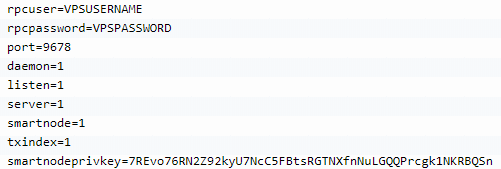
Entering smartnode genkey data in smartcash.conf